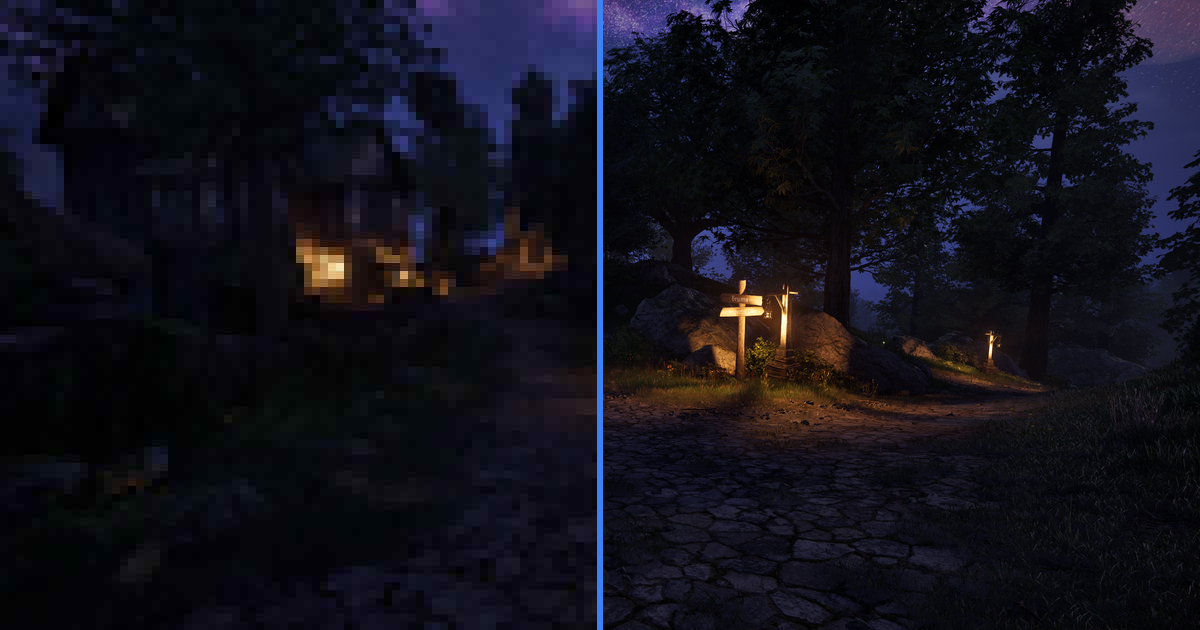
There’s a thread on the OpenAI developer forum titled “ChatGPT cannot see difference between images”. The poster uploaded two near-identical diagrams, asked what changed, and was told they were the same image. They weren’t. Threads like it keep appearing.
Here’s what’s going on. When you upload two images to a chat assistant, the resolution the model actually sees depends on rules you can’t watch working and mostly can’t control. On many models it gets a much smaller copy of your files. Both companies document the details, and once you run the numbers you’ll know which comparisons AI handles fine and which ones need your own eyes.
What resolution the model actually sees
Vision models turn images into tokens, the same currency as text. Tokens cost money, so most models put a hard budget on each image, and both vendors publish exactly how the accounting works. Almost nobody reads those docs before uploading screenshots.
OpenAI’s documentation describes two regimes. GPT-4o class models fit your image inside a 2048x2048 box, scale it again so the shortest side is 768 pixels, then slice it into 512-pixel tiles at 170 tokens each. Follow a 4K screenshot through that: 3840x2160 becomes 2048x1152, then 1365x768, and about 13% of the pixels survive. The newest flagships loosened the rules: gpt-5.4 and later offer an “original” detail mode with room for 10,000 patches, and GPT-5.6 takes the full input dimensions without resizing at all. There are two catches. A 4K frame at original detail runs over 8,000 visual tokens per look, and inside a chat app you have no way to tell which treatment your upload got, since the interface looks identical whether the model saw every pixel or an eighth of them.
Anthropic’s documentation is just as specific about Claude. Images are processed as 28x28-pixel patches called visual tokens, and since a full 4K screenshot would need more than ten thousand of them, every model gets a budget: 1568 tokens on most, 4784 on the newest tier. Anthropic’s sizing table puts that same screenshot at roughly 1560 tokens on standard models, which works out to about 1.2 megapixels, under 15% of what you uploaded. The newest models keep about 45%.
What the shrink destroys
Think about what actually lives in the pixels when you compare two versions of an image.
JPEG compression artifacts sit in 8x8-pixel blocks. Downscale a 4K screenshot to 768 pixels tall, a 2.8x linear shrink, and each block collapses into roughly 3x3 pixels of mush averaged together with its neighbors. Sharpening halos from an edit or an AI upscaler are one or two pixels wide, so they land below a single pixel and vanish outright. Color banding in a sky gradient blurs to the point you can’t judge it. The grain that tells you whether an upscaler invented texture or preserved it doesn’t survive at all, and neither does the shimmer between two anti-aliasing settings, which is often the entire reason a modder took the screenshot in the first place.
The model doesn’t know what it lost, either. Anthropic’s docs warn that Claude “might hallucinate or make mistakes when interpreting low-quality” images, and that compression artifacts are “detrimental to model performance”. The answer arrives confident either way, describing differences that may or may not be there. That’s how those forum threads happen: the differences were real, they just weren’t in the copy the model looked at.
Animated GIFs deserve their own warning. Claude reads only the first frame, per the same docs, which means a GIF-vs-GIF comparison in a chat is really a comparison of two stills. The chat interface doesn’t surface that anywhere.
What AI comparison is actually good at
Plenty of comparison questions are ones assistants handle well.
Semantic differences are the sweet spot. An assistant will spot the moved object or the changed label between two UI screenshots, and it’ll notice when the second photo has an extra person in it. Content survives downscaling, and models read content well.
Assistants are also good at explaining. “The second one has lifted shadows and a warmer white balance” is a real answer to why two images look different, and a slider won’t articulate that for you. Same goes for “what should I look for when judging an upscale”.
But telling isn’t showing. Even when the model describes a difference correctly, you’re left holding a paragraph. You can’t verify it or zoom into it, and you can’t hand it to someone else so they can see it for themselves.
The workflow that works
Ask the assistant what to look for. Then look yourself, at 100%, on the original files.
That second half is what imgi is for. Both images load pixel-aligned in the same spot with a slider between them. Mouse wheel zooms to actual pixels, and dragging the divider across a sharpening halo settles the question in a second. Files are served byte for byte as uploaded, never re-encoded, because judging fine detail through someone else’s compression is the exact trap this whole post is about.
Here’s a live one: the same graphic saved clean and run through heavy JPEG compression. Real cases are subtler than this demo, but the slider shows you exactly where the sky grows stripes instead of telling you “the second image has more artifacts”:
For a subtler real case, here’s an album of EveRedux, DrAdam’s face mod for Stellar Blade, against vanilla: seven pairs behind one link. An AI summary of the first pair reads something like “the second image has red eyes and different jewelry”, which is true, and misses the skin work entirely.
The comparison gets a permanent link to hand to whoever asked, and an embed snippet if it belongs in a writeup like this one. And if the images shouldn’t leave your machine at all, offline mode runs the same slider entirely in your browser with nothing uploaded, which is more privacy than any chat upload can offer.
Try it on your own files
This is a five-minute experiment, and it’s worth running instead of taking this post’s word for anything.
Take any photo. Save a copy at JPEG quality 80. Upload both to ChatGPT or Claude and ask what’s different. Then drag the same two files into a comparison slider and zoom into a shadow area or a clear sky. The assistant may or may not nail it; in the threads linked above it didn’t. The slider shows you the blocking in the shadows regardless.
Quick answers
Can ChatGPT tell the difference between two images? For content-level differences, usually yes. Pixel-level depends on the model: GPT-4o class models resize to 768 pixels on the shortest side before analysis, while the newest flagships can accept the original, and a chat user has no way to tell which happened. OpenAI’s own forum has threads about misses in both directions.
Why does ChatGPT say my two images are identical when they’re not? If the difference lives in fine detail (compression quality, sharpness, small text, subtle grading), it may literally not exist in the downscaled copy the model analyzes. Point it at a specific region and ask again, or check the pair yourself on a slider at full resolution.
Does Claude see images at full resolution? No. Every Claude model has a visual token budget (1568 tokens on most models, 4784 on the newest), and images past it are downscaled before analysis, per Anthropic’s vision documentation. Claude also processes images as 28x28-pixel patches rather than individual pixels.
How do I compare two images at full quality online? Use a slider that serves the exact files you uploaded, with no re-encoding. imgi aligns the pair perfectly and adds zoom plus a permanent shareable link, no account needed.