
Search “image slider for websites” and half the results are carousels, the rotating-photo kind. The other thing sharing the name is a before and after slider: one frame, two versions of the same image, a handle you drag to reveal the change. This guide is about the second kind, and specifically about getting one onto your own site without installing a plugin or writing any JavaScript.
The short version: make the comparison in your browser, copy one line of HTML, paste it into any platform that accepts an embed. The longer version below covers each platform’s quirks, the plan restrictions that trip people up (two big builders block iframes on their cheapest tier), and what to do on platforms that strip embeds entirely.
Here’s the thing you’re building, live. Drag the handle:
Make the comparison first
Open imgi.co, drop in your before and your after, and check the alignment. The two images should be the same size; if one’s cropped differently, the slider shows the misalignment instead of the change. Label the sides, then hit Publish. You get a permanent link plus the embed code for that exact comparison. No account needed, and the link doesn’t expire.
Copy the embed from the Embed panel. It’s a plain iframe:
<iframe src="https://imgi.co/embed/{your-id}" width="640" height="360" style="border:0;border-radius:12px;background:transparent" loading="lazy" title="imgi comparison"></iframe>
One line. No script tag, no stylesheet, no library to keep updated. That matters more than it sounds: platforms that panic about script tags will still take a plain iframe, and your page’s load time doesn’t change because the iframe loads lazily, off the critical path.
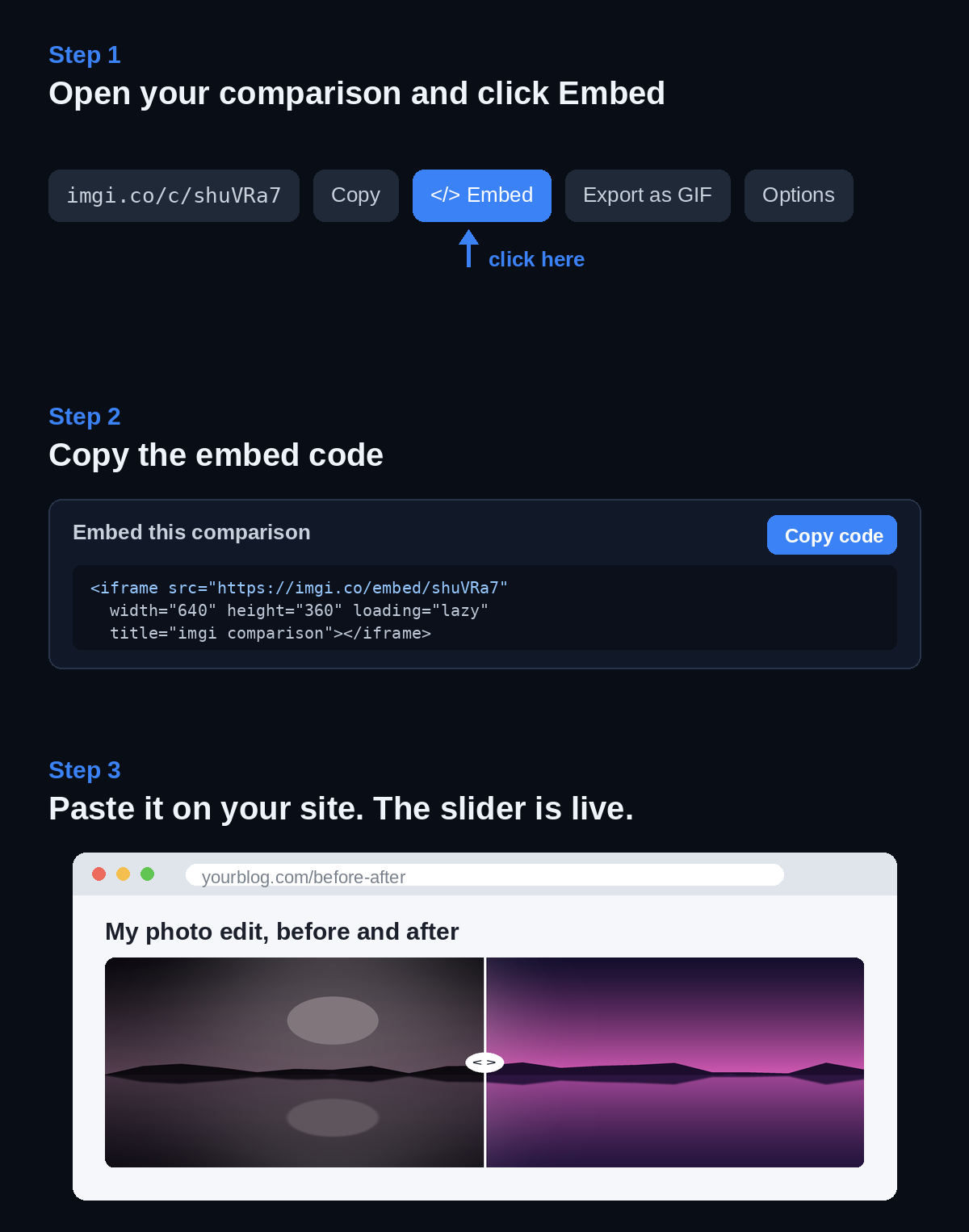
Where to paste it, platform by platform
WordPress, self-hosted. Add a Custom HTML block, paste, done. Easiest of the bunch, and no plugin involved, which is sort of the point: your before and after slider comes from an iframe, not from yet another slider plugin with its own settings page and update schedule.
WordPress.com. A different story from self-hosted, and the one that surprises people. The free tier strips iframes out of Custom HTML blocks for security reasons; embedding one needs a plan with hosting features, Business and up. Their custom HTML support page has the current rules. On free WordPress.com, skip to the GIF option below.
Squarespace. Use a Code block and paste the iframe. Works on the Core, Plus, and Advanced plans (and the older Business and Commerce ones), but not on Personal, where iframes are disabled. Annoyingly, iframes do work during the free trial, so a slider can vanish when you pick Personal at launch. Squarespace’s code block docs spell it out.
Ghost. Add an HTML card in the editor and paste. Ghost doesn’t fuss about iframes.
Webflow. Drop in an Embed element and paste. Custom code needs a paid site plan or workspace; on the free Starter plan the Embed element shows an upgrade prompt instead of rendering.
Framer. Add an Embed component and hand it the iframe.
Wix and other builders. Look for an element called Embed HTML, Custom code, or similar. If it accepts raw HTML, the iframe works.
Notion. Don’t paste the iframe, Notion doesn’t run raw HTML. Type /embed and paste the comparison’s normal link, the imgi.co/embed/… URL, and Notion frames it itself. Drag the side handles to size it.
GitHub READMEs, Reddit, Discord, forum posts. These strip iframes, full stop. Export the comparison as a GIF or MP4 and post that instead; the before and after GIF guide covers the export.
Sizing it so it doesn’t look bolted on
The width and height in the snippet are just defaults. Two changes cover most layouts.
Set width=“100%” and the slider fills whatever column it sits in, which is what you want on any responsive site. Then match the height to your images’ shape: a 16:9 screenshot in a 640-wide column wants roughly 360 of height, a portrait photo wants more. If the frame’s shape is too far off from the images’, you get letterbox bars. They look fine, they just waste space.
If your builder supports it, an aspect-ratio wrapper is cleaner than a fixed height. But eyeballing the height gets you 95% of the way and takes ten seconds.
When the slider doesn’t show up
Three causes cover nearly every case:
- Your plan strips iframes. WordPress.com free and Squarespace Personal are the usual suspects. The tell: the block saves fine but renders empty, or renders your code as visible text.
- You pasted into a rich-text field instead of an HTML or code element. Rich-text editors escape the markup. Find the platform’s raw HTML block and paste there.
- The editor preview blocks embeds but the published page is fine. Webflow and some page builders do this. Publish and check the live page before assuming it’s broken.
If none of those fit, open the imgi.co/embed/… URL directly in a new tab. If it loads there, the comparison is fine and the problem is on the page side.
More than one slider on a page
Multiple embeds on the same page are fine. Each iframe loads lazily, so ten comparisons down a long portfolio page don’t slow the first paint; each one fetches its images when the reader scrolls near it. Keep the snippets identical except for the ID and they’ll line up in a tidy column with no extra CSS.
Past four or five, consider a different shape: group the comparisons into an album on imgi and link that instead. Readers flip through the pairs on one page, and you can reorder or swap scenes later without touching your site again. A renovation page with twelve rooms reads better as two or three embedded highlights plus one album link than as twelve stacked iframes.
Why not a slider plugin or a JS library?
If you’re a developer who wants full control inside your own product, a library is the right call. JuxtaposeJS and img-comparison-slider are the known ones, and the tools roundup compares that route against the hosted tools. For everyone else, the iframe wins on maintenance: nothing to update, nothing that conflicts with your theme, and the same comparison doubles as a shareable link you can send in a chat or a client email. One comparison can also hold up to ten images with a dropdown that swaps which pair is under the slider, handy when a page needs to show several versions without a wall of embeds.
Make one, paste it, check the published page. That’s the entire workflow.