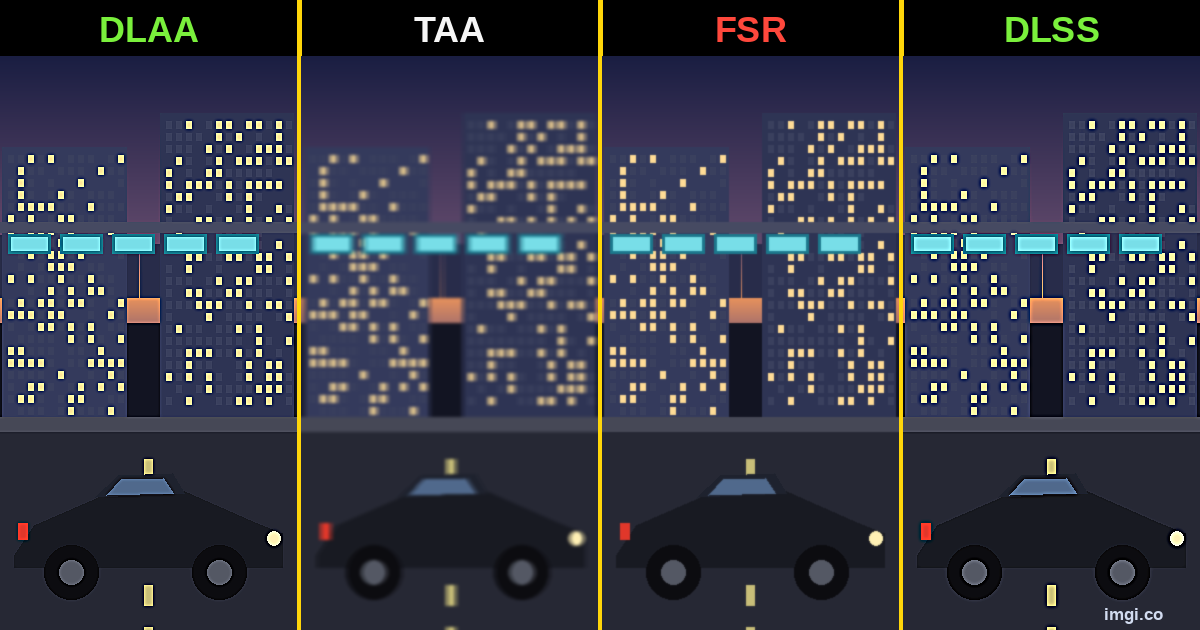
Every DLSS vs FSR vs TAA thread plays out the same way. Two people look at the same screenshots and each walks off sure the other guy’s pick is the blurry one. They’re usually both a little right, which is exactly the problem: the comparison was already broken before anyone zoomed in.
Making a fair one is fiddlier than it looks, and most comparisons online cheat without meaning to. Let’s fix that.
Where things actually stand
Rough pecking order in 2026: DLSS 4 with the transformer model is out front, mostly because it finally sorted out motion. The stuff that used to crawl and sparkle when you panned, power lines, railings, chain-link, mostly holds still now. DLAA is technically the best-looking since it runs the same AI at native res instead of upscaling, but you pay for it in frames. FSR 4 on RDNA 4 got close enough that at matched presets I have a hard time calling it in a still, though it still drops a little detail in hair and foliage. XeSS 2 is fine, middle of the pack on Intel cards.
And then there’s TAA, which is what half of you are trying to escape in the first place. Soft, smeary, ghosting trails behind anything that moves. In one recent blind comparison, a lot of people picked DLSS over even native rendering, which tells you how far this has come, and also that your own eyes on your own monitor beat any headline. Which is the whole reason to make your own comparison instead of trusting someone else’s crop.
The part everyone screws up
Most of what actually separates these only shows up in motion. Shimmer on a far fence, ghosting behind a sprinting character, foliage that sparkles as you walk past, none of it lands in a frozen frame. A still nails edge aliasing, fine detail, overall sharpness. Anything that actually moves, though? Close to useless.
So work out what you’re even testing before you shoot. Edges and detail? Screenshots are perfect. Shimmer and ghosting? You need video, or you at least need to admit a still won’t show it. Half the arguments online are just one person judging detail and the other judging motion off the same image, both sure the other one is blind.
Getting two shots that actually match
When you compare screenshots this way, everything hinges on the two shots being identical except for the one thing you changed. Sounds easy. It really isn’t, and that’s where most comparisons quietly fall apart.
Change one setting, nothing else. Same spot, same resolution, same everything. Swap TAA for DLSS and bump the res at the same time and you’ve learned nothing. Use the game’s own screenshot key if it has one, since it grabs straight from the engine instead of adding a compression pass on the way out. On Steam, flip on “Save an uncompressed copy” so you get a PNG and not a JPEG. Line up the frame. This is the annoying part, and the one that actually matters. Photo mode, a pause, a benchmark that replays the same camera path, a save right before a fixed view, whatever it takes. A couple degrees of camera drift and the whole thing is junk. Turn the HUD off. A health bar in one shot and not the other is distracting, and it quietly proves your frames don’t line up. Shoot at native resolution. Lower or stretched looks soft for reasons that have nothing to do with the setting you’re testing.
Then name the files before you forget which is which. Ask me how I know.
What to actually look at
Two matched shots in hand, don’t just stare at the middle of the frame. Go poke at the stuff that’s hard to render:
Thin geometry, wires and railings and distant fences, which is where aliasing and shimmer live. Hair and foliage, first thing to go when an upscaler runs out of detail. Hard edges against a bright sky. Jaggies have nowhere to hide up there. Text and the HUD, if it’s on. Far buildings and terrain, where a weaker method just smears everything into paste. Anything that would be moving, because even in a still you can sometimes catch the smeared trailing edge that gives ghosting away.
A side by side makes you do the work, flicking back and forth and lining things up in your head. A slider stacks both images in the same spot and lets you drag between them, so the difference just pops instead of hiding in the gap between two frames.
Then hand it to someone who can judge it
This is the step that makes your comparison worth anything to anyone but you. Two shots into an image comparison slider, line them up, label the sides, one link. Here’s one, go drag it:
One thing this isn’t: an image diff that flags exact changed pixels. That’s handy for catching a watermark or a sneaky compression tweak, but for a before after image comparison of DLSS against TAA you want your own eyes on a slider, not a pixel heatmap.
Two rules for a quality comparison specifically. Don’t let whatever tool you use recompress the images, or you’re comparing JPEG artifacts instead of the setting you tested, which is a shockingly common way to waste an hour of careful work. imgi has a Max quality toggle, free, that leaves your originals alone. And actually label the sides, because an unlabeled comparison just restarts the argument you were trying to end.
Posting somewhere that won’t run a live slider, like most of Reddit? Export the same screenshot comparison as a GIF or MP4 so people still see the swap. And if the real difference is a motion thing, say so and link a clip, because no slider on earth shows ghosting.
The ways people wreck this without noticing
- Different scene or camera angle. The big one, and people do it constantly.
- A JPEG sneaking into the pipeline and softening both shots unevenly.
- Two different capture resolutions.
- A sharpening filter left on for one shot and off for the other.
- Screenshots cropped and pasted back at different sizes.
- Calling a motion artifact off a still, then defending it for forty replies.
Dodge those and your comparison is already more honest than most of what gets posted. Low bar, but worth clearing.
Whether you’re building a DLSS comparison, an FSR comparison, or a TAA comparison to settle a thread once and for all, the method doesn’t change. You’re not trying to crown a winner for everyone. You’re showing, fairly, what it looks like on your rig, in your game, so the next person can make up their own mind. That’s the whole job.
Common questions
Can a screenshot actually show the DLSS vs FSR vs TAA difference? For edges, fine detail, and sharpness, yeah, a matched still is perfect. For shimmer and ghosting, no, those only exist in motion, so use a short clip when that’s the point.
Best way to compare two upscalers fairly? Same scene, same resolution, only the upscaler changed. Save it uncompressed, then drop both into a before and after slider so they sit in the exact same spot. Don’t recompress anything on the way.
Why do my comparison screenshots look softer than the game does? Almost always a lower or non-native capture resolution, or a JPEG getting added by a screenshot tool or an upload step. Shoot at native res with the game’s own screenshot function and keep the files uncompressed.